
Orion Stars Supported on CitySpin
Orion Stars Customer Service, Login and Account Help
Get Orion Stars help for login problems, account access, app downloads, transfers, redemptions, missing balances, common errors, and suspicious links.
Quick Answer
The correct Orion Stars support path depends on who created your game account and where the affected transaction began. CitySpin can investigate CitySpin-managed credentials, access links, balances, and transaction records. Accounts or payments handled solely by another operator or agent normally must be resolved by that provider.
Reviewed by CitySpin Team · Reviewed CitySpin workflow · Independent guide · Player-focused documentation
At a Glance
- Difficulty
- Beginner
- Reading Time
- 17 min
- Category
- Game Support
- Last Reviewed
- Estimated Completion Time
- 12 min
Terms in this guide
Main Guide
What is OrionStars and what does CitySpin manage?
Orion Stars is a third-party game platform available through supported CitySpin account workflows. CitySpin does not own or operate Orion Stars. For an eligible CitySpin-managed account, the authenticated game panel can create or load separate game credentials, display an account-specific Open Game Link, show Balance In Game, and provide Transfer to Game and Transfer Back controls.
| Item | Where it appears | Who can inspect it |
|---|---|---|
| CitySpin account | CitySpin sign-in and account area | CitySpin |
| Game Credentials | Authenticated Orion Stars game panel | The provider that created them; CitySpin when CitySpin created or loaded them |
| CitySpin wallet | CitySpin wallet and balance surfaces | CitySpin |
| Balance In Game | Orion Stars game panel after a live check | The current game-account provider; CitySpin can request a live check for its managed record |
| External payment | The payment provider or recipient's record | That payment provider or recipient |
Who created or controls your Orion Stars account?
Before looking for Orion Stars customer service, identify who issued the username and password, who supplied the access link, and who received or initiated the affected transaction. Those can be different parties. A logo, domain name, social profile, or use of the word official does not prove access to your account.
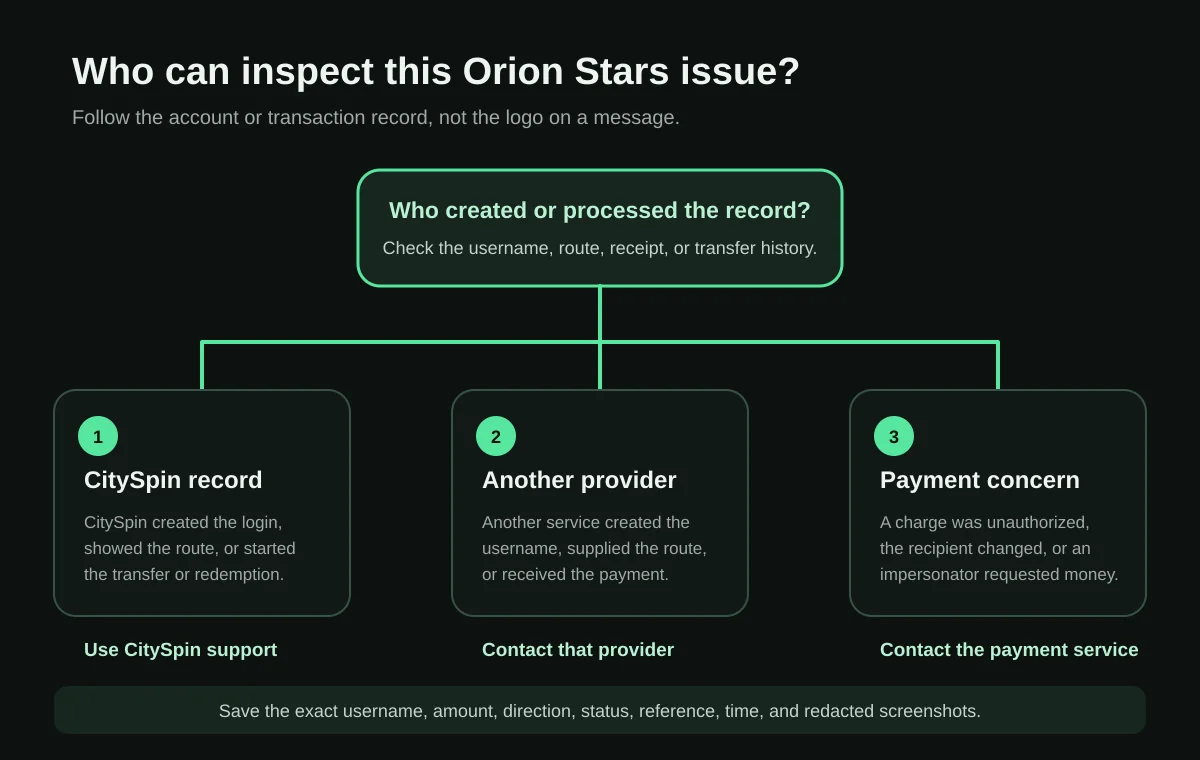
| Decision | Question to answer |
|---|---|
| Account creator | Who issued the Orion Stars username and password? |
| Affected record | Is the issue a login, access link, game balance, CitySpin transfer, redemption, or external payment? |
| Safe next action | Which authenticated support channel belongs to the party that controls that record? |
Orion Stars Customer Service: Who Should You Contact?
Searches for Orion Stars customer service, OrionStars customer service, an Orion Stars support number, live chat, or agent support often mix unrelated account providers. CitySpin has not verified one public contact that has universal access. Use the support owner table before calling a number or messaging a profile found in search results.
| Situation | First support owner | Safe next action |
|---|---|---|
| CitySpin created the Orion Stars account | CitySpin | Contact CitySpin with the game username, device, exact error, and a redacted screenshot |
| CitySpin initiated the transfer | CitySpin | Provide the amount, direction, timestamp, time zone, and displayed status |
| Another operator or agent created the account | That provider | Use the original authenticated channel that issued the credentials |
| Another party received the payment | That payment recipient or operator | Preserve the receipt and request the applicable transaction record |
| The account owner is unknown | Identify who issued the credentials and who received payment | Do not create a duplicate account or send another payment first |
| The transaction appears unauthorized | Relevant financial or payment provider | Report it promptly through the provider's fraud process |
Resolve a Orion Stars issue without repeating actions
The exact controls and eligibility shown in your account remain the source of truth.
- 1Identify the issue
Separate login, access, transfer, and balance issues.
- 2Capture the status
Read the exact status or error first.
- 3Check current records
Refresh the relevant record once.
- 4Prevent duplicates
Do not repeat an action while its state is unclear.
- 5Escalate with evidence
Include the time, amount, and message shown.
CitySpin login versus Orion Stars login
Your CitySpin email and password open CitySpin. The Game Credentials shown inside the Orion Stars account panel contain a separate game username and password. Do not assume either pair works in the other sign-in form, and do not send either password to support.
| Credential | Purpose | Recovery owner |
|---|---|---|
| CitySpin email and password | Sign in to CitySpin and open the account workflow | CitySpin account recovery |
| Orion Stars game username and password | Sign in through the account-specific Orion Stars route | The provider that created the game credentials |
Orion Stars login and password recovery
For a CitySpin-managed Orion Stars login, sign in to CitySpin, open the Orion Stars game panel, and copy the displayed Game Credentials and current Open Game Link. If those exact values fail, preserve the error and ask CitySpin to inspect the managed record. Credentials from one operator may not work on another operator's route.
| Symptom | First check | Next action | Avoid |
|---|---|---|---|
| Wrong password | Confirm the same account-specific login route and copy the displayed value | Contact the account creator | Repeated guessing or creating a duplicate |
| Username not found | Confirm spelling and account provider | Request account lookup from the creator | Unrelated portals |
| Account locked | Record the exact message | Contact the support owner | Paying an unsolicited unlock fee |
| New device problem | Check whether the account provider requires a verified binding step | Follow only provider-confirmed steps | Unknown profiles or APKs |
| Login works but balance is missing | Compare the CitySpin wallet with Balance In Game | Check the transfer direction and status | Repeating the transfer immediately |
New-device binding and account recovery
CitySpin did not find a universal Orion Stars bind, unbind, or new-phone process that applies to every provider and app version. If access changes on a new device, keep the existing username and evidence, return to the provider that issued the account, and ask whether that specific account requires a binding change.
- Do not create a second game account unless the account owner confirms that the original cannot be recovered.
- Do not remove an enterprise profile or app until the account and transaction evidence is saved.
- Do not assume an unbind fee or remote-device session is legitimate.
- Use the current CitySpin game panel when CitySpin created the original account.
Orion Stars download and access methods
A search for Orion Stars download, OrionStars APK, Orion Stars iPhone download, PC, or web version can lead to store listings, APK mirrors, QR codes, shortcuts, profiles, and browser routes that are not interchangeable. The only CitySpin access method verified for this review is Open Game Link inside the authenticated game panel for the matching account.
| Access type | What it is | Verification status for CitySpin-managed Orion Stars accounts |
|---|---|---|
| Current account-specific link | The Open Game Link shown with the account's credentials | CitySpin-verified workflow; final destination can vary by device |
| Browser access | A game route opened in a web browser | Present in the CitySpin workflow; broad browser compatibility was not independently tested |
| Google Play application | An Android app installed from Google Play | No universal compatible listing verified |
| APK or XAPK | An Android installer obtained outside or alongside an app store | Package, version, hash, signer, permissions, and compatibility not verified |
| iPhone web shortcut | A home-screen shortcut to a web route | No universal setup verified |
| Enterprise profile | A profile that can manage or install software on a device | No current universal Orion Stars profile verified |
| Old bookmark, QR code, or message link | A saved or forwarded route | Treat as unverified until the account owner confirms the final destination |
Orion Stars on Android
On Android, start from the authenticated CitySpin Orion Stars panel and use its current Open Game Link. Keep Google Play Protect enabled. If the route asks for an APK, XAPK, unknown-source permission, device-administrator access, or a profile, stop and ask the account owner to verify the exact final domain and file before proceeding.
Orion Stars on iPhone and iOS
For iPhone access, use the current route supplied with the matching account. CitySpin did not verify a universal App Store listing, enterprise certificate, configuration profile, or add-to-home-screen process. Apple advises users to review unexpected profiles in Settings and remove only after preserving needed account evidence.
Orion Stars web login and desktop access
The current CitySpin game panel opens an account-specific Orion Stars link in a separate browser tab and tells the user to sign in with the displayed game credentials. That verifies a browser-link workflow, not a universal Orion Stars web-login domain. Old bookmarks and unrelated operator portals may reject the same username.
- Open CitySpin from a saved or typed cityspin.io address.
- Open the Orion Stars game panel tied to the account.
- Copy the Game Credentials instead of retyping from memory.
- Use the current Open Game Link and verify the final host before entering credentials.
- Stop if the redirect chain, certificate warning, or destination differs unexpectedly.
Verify an app, APK, profile, QR code, or link
| Label | Meaning |
|---|---|
| CitySpin-verified workflow | Confirmed in the current CitySpin product source or authenticated account flow |
| Public third-party information | Published outside CitySpin and cited to its exact source |
| Varies by operator or app version | May differ across account creators, devices, or releases |
| Reported by users | A report that is not proof of a universal condition |
| Not independently verified | CitySpin did not establish the identity, function, or compatibility claimed |
| Unknown | The available evidence is not sufficient for a safe conclusion |
- Compare the original source with the party that issued the game account.
- Inspect the final destination, not only the link text, QR code, or logo.
- For an installer, require a package name, version, hash, signer or certificate, permissions, test date, and account-compatibility result.
- Keep device security checks enabled and reject pressure to disable them.
- Ask why a domain, payment recipient, certificate, or install method changed.
CitySpin wallet versus Orion Stars game balance
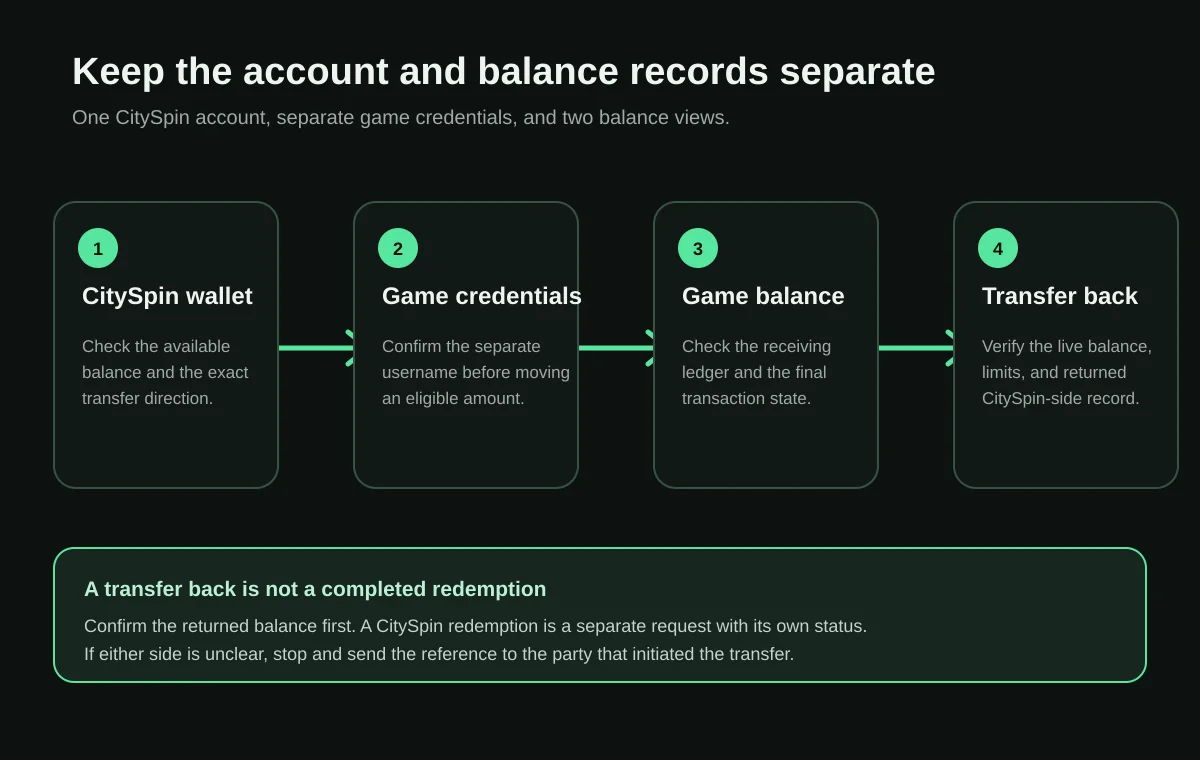
The CitySpin wallet and Balance In Game are separate displays. A change on one side does not prove the other side updated. Before retrying, record both balances, the direction, amount, username, time, time zone, transaction reference, and displayed state.
| Term | Meaning |
|---|---|
| CitySpin wallet | The balance shown in the CitySpin account workflow |
| Balance In Game | The live balance associated with the intended Orion Stars game username |
| Transfer to Game | Move an eligible amount from the CitySpin wallet into the game workflow |
| Transfer Back | Move an eligible game amount back toward the CitySpin wallet workflow after a live check |
| Redemption request | A separate CitySpin request started after the returned amount is available and current eligibility is reviewed |
| External payment destination | The financial account or method used for a later approved payment; it is not the game balance |
Transfer to Orion Stars and transfer back
The verified CitySpin sequence is: CitySpin wallet, Transfer to Game, Balance In Game, Transfer Back, CitySpin wallet, then a separate redemption request. The exact controls, eligible amount, limits, and status shown in the signed-in account remain the source of truth.
| Stage | Record or action | Checkpoint |
|---|---|---|
| 1 | CitySpin wallet | Confirm the available CitySpin balance |
| 2 | Transfer to Game | Choose the Orion Stars account, amount, and direction, then confirm once |
| 3 | Balance In Game | Use Check live game balance before relying on the displayed amount |
| 4 | Transfer Back | Complete the required live check and return an eligible amount |
| 5 | CitySpin wallet | Confirm the returned amount appears on the CitySpin side |
| 6 | Redemption request | Start a separate request only after the returned amount and current eligibility are clear |
Orion Stars redeem, cash out, and CitySpin redemption
Players may use redeem, cash out, withdraw, and transfer back as if they mean the same thing. In the current CitySpin workflow, Transfer Back is the game-panel action that returns an eligible balance. A CitySpin redemption is a different request on the Redeem route. This guide does not publish universal Orion Stars withdrawal limits or processing times.
Pending, completed, failed, declined, or unclear transactions
| State | Meaning | Safe action |
|---|---|---|
| Pending | The action has not completed | Preserve the timestamp and do not submit a duplicate |
| Completed but balance missing | A record may exist in one system but not the expected destination | Compare both balances and contact the owner of the initiating record |
| Failed | The transfer did not complete | Confirm whether the original balance was restored |
| Declined | The request was not approved | Review the displayed reason and current CitySpin terms when CitySpin owns the request |
| No visible status | The source record is unclear | Preserve screenshots, both balances, and transaction references |
| Operator not responding | Support ownership remains unresolved | Use the original authenticated channel and send one complete evidence packet |
| Additional fee requested | Terms or identity may be unclear | Pause and request written terms before sending anything else |
Orion Stars not working and common errors
| Symptom | First check | Safe fix | Escalation owner |
|---|---|---|---|
| Black screen or loading problem | Connection, browser, and current account-specific route | Retry the verified route without repeating a transaction | CitySpin when CitySpin supplied the route |
| Network unstable | Local connection and whether other sites load | Change connection or retry after preserving the current state | Account provider if the error persists |
| Server unavailable | Whether one device, one route, or every route fails | Preserve the exact error and time | Current service owner |
| App disappeared | Whether it was a shortcut, store app, profile, or enterprise install | Reopen the verified CitySpin route | CitySpin for CitySpin-managed access |
| Certificate or profile error | Issuer, final host, device date, and current support method | Do not trust an unknown profile or bypass a warning | Account provider |
| Wrong password or username not found | Game Credentials and the account-specific route | Copy the exact values and request account lookup | Account creator |
| Balance missing | CitySpin wallet, Balance In Game, direction, and status | Review the transfer record before retrying | Transaction owner |
If Orion Stars reports a server down, certificate, network, login, or loading error, quote the screen exactly. Words such as hacked, lost, or broken are conclusions, not diagnostic evidence.
Fake Orion Stars links, agents, profiles, and recovery scams
Evaluate OrionStars as a platform, a specific website, a specific app or APK, an account provider, an agent, a payment recipient, and a transaction separately. A safe conclusion about one item does not establish the others. CitySpin cannot certify every Orion Stars-branded domain, contact, app, or payment request.
- Unexpected payment required to release, unlock, verify, or recover funds
- A changed payment recipient or unexplained domain change
- A request for a password, one-time code, recovery code, or remote-device access
- A recovery service demanding an upfront fee
- An unknown APK, enterprise profile, certificate, or device-management request
- Pressure to act immediately or submit a duplicate payment
- A claim of official service authority with no verifiable access to the account
Games and device availability
CitySpin currently lists Orion Stars as a supported third-party game platform and supplies separate credentials and an account link for eligible accounts. The exact game catalog, device support, browser behavior, app source, and availability can change by account, provider status, device, and region. This page does not promise a particular game title or device.
Evidence to send Orion Stars support
Send one concise, redacted packet through the authenticated channel owned by the account or transaction provider. The checklist is designed to let support locate the record without collecting secrets.
- CitySpin account email or identifier
- Orion Stars game username
- Account creator or provider
- Original game link
- Device and operating system
- Browser or app version
- Exact error message
- Transaction amount and direction
- Date, time, and time zone
- Displayed transaction status
- CitySpin wallet balance
- Orion Stars Balance In Game
- Redacted screenshots
- Transaction reference
- Prior support messages
What CitySpin can and cannot resolve
| CitySpin can investigate | CitySpin cannot claim or change |
|---|---|
| CitySpin account access and wallet records | Another provider's private account database |
| Game Credentials CitySpin created or loaded | Credentials created solely by another operator |
| The Open Game Link displayed in CitySpin | Every Orion Stars-branded website, app, APK, profile, or contact |
| CitySpin-initiated transfers and live-balance requests | A payment sent directly to another recipient |
| CitySpin redemption records and displayed states | Universal Orion Stars limits, timing, policies, or service status |
With a CitySpin-managed Orion Stars account, credentials, access links, transfers, and support ownership are handled through CitySpin's documented workflow. That statement applies only to the records CitySpin creates or processes; it is not a promise to recover balances or accounts held elsewhere.
Sources, review method, and change log
Review method: CitySpin's current React game panel, game-account API calls, live-balance request, transfer and transfer-back actions, public support and policy pages, and existing Knowledge Center architecture were reviewed on July 23, 2026. No universal external Orion Stars contact, APK identity, iPhone profile, device matrix, rating, review, payout time, or operator policy was treated as verified.
| Date | Version | Change |
|---|---|---|
| July 22, 2026 | 1.0 | Published the single Orion Stars support-ownership pillar and original decision visuals |
| July 23, 2026 | 2.0 | Added task-first navigation, verified CitySpin terminology, login and device guidance, transaction states, evidence labels, fuller safety guidance, and search-intent coverage |
Orion Stars on CitySpin
A third-party game platform available through supported CitySpin account workflows.
- Category
- Third-party game platform
- Supported on CitySpin
- Supported
- Availability
- Available to eligible CitySpin accounts where permitted.
- Requirements
- A CitySpin account, eligibility for the available workflow, and the separate game credentials shown in your account panel.
- Supported platforms
- Mobile and desktop access can vary by account, device, browser, and the current game link.
- Compatibility
- Use the current access method shown in your CitySpin game panel; availability can vary by device and account.
Frequently asked questions
What is the Orion Stars customer-service number?
CitySpin has not verified one phone number that can inspect every Orion Stars account. Start with the party that created the username, supplied the access route, or processed the affected transaction. Use CitySpin support only for a CitySpin-managed record.
How do I contact Orion Stars support or live chat?
Use the authenticated support route operated by the provider that created the account. For a CitySpin-managed account, use the CitySpin Help Center. CitySpin has not established that a public Orion Stars-branded phone number or live chat has universal account access.
Why is my Orion Stars login not working?
First confirm that you are using the Orion Stars username, password, and current access link issued for the same account. CitySpin login details and Orion Stars game credentials are separate. Preserve the exact error before asking the account creator to inspect the record.
How do I reset an Orion Stars password or recover a username?
Password and username recovery depend on who created the game account. CitySpin can investigate credentials shown in a CitySpin-managed game panel. Another operator must handle credentials it created. Do not create a duplicate account just to bypass a login problem.
Where should I download Orion Stars on Android or iPhone?
For a CitySpin-managed account, begin with Open Game Link in the authenticated CitySpin game panel. CitySpin has not verified one universal APK, Google Play listing, iPhone profile, or installer for every Orion Stars account, so this guide does not link to download mirrors.
What should I do when an Orion Stars balance or transfer is missing?
Compare the CitySpin wallet with Balance In Game, record the transfer direction and displayed status, and avoid submitting a duplicate while the state is unclear. CitySpin can inspect a transfer it initiated; another provider must inspect its own record.
Is Transfer Back the same as an Orion Stars cash out or CitySpin redemption?
No. Transfer Back returns an eligible game balance toward the CitySpin wallet workflow. A CitySpin redemption is a separate request made after the returned amount is visible and remains subject to the current account terms and eligibility shown in CitySpin.
What should I do if Orion Stars shows a black screen or server error?
Preserve the exact message and time, check whether the current account-specific route fails on one connection or device, and retry without repeating any transaction. CitySpin can investigate a CitySpin-supplied route; provider-wide service status remains with the current service owner.
Is Orion Stars safe, official, or a scam?
A platform name alone cannot establish whether a particular site, app, APK, profile, agent, payment recipient, or transaction is trustworthy. Verify each item separately. CitySpin does not make a blanket claim that every Orion Stars-branded route is safe or fraudulent.
Can CitySpin recover an Orion Stars account or balance created elsewhere?
CitySpin can inspect CitySpin-managed credentials, access links, wallet records, transfers, and redemption records. It cannot inspect or change private records controlled solely by another operator, agent, app, website, or payment recipient.
Sources & References
Version 2.0
- CitySpin Help CenterCitySpin
CitySpin support route for account, wallet, transaction, and supported game records.
Accessed - CitySpin Terms of ServiceCitySpin
Current account, eligibility, transaction, third-party platform, and redemption conditions.
Accessed - CitySpin Responsible Social PlayCitySpin
Player controls, warning signs, support options, and confidential external help resources.
Accessed - Use Google Play Protect to help keep apps safeGoogle Play Help
Primary Android guidance for app checks, harmful-app warnings, and unknown-source protection.
Accessed - Review and Delete Configuration ProfilesApple Support
Primary Apple guidance for finding and reviewing unexpected device-management profiles.
Accessed - Refund and Recovery ScamsFederal Trade Commission
Primary consumer guidance about recovery-fee and follow-on scam warning signs.
Accessed - What To Do if You Were ScammedFederal Trade Commission
Primary guidance for protecting payment accounts, preserving evidence, and reporting suspected fraud.
Accessed
Summary
Identify who created the Orion Stars account and who owns the affected login, link, balance, transfer, redemption, or payment record. For a CitySpin-managed account, use the separate Game Credentials and current Open Game Link, keep the CitySpin wallet and Balance In Game distinct, check one final state before retrying, and send redacted evidence to CitySpin. Records controlled solely elsewhere must be handled by that provider.
Continue Your Journey
Choose the next step that matches what you need. Nothing here interrupts or changes the guide you just read.