
Fire Kirin Supported on CitySpin
FireKirin Games & Fish Tables: How to Play Safely
Understand FireKirin games, fish-table controls, game categories, beginner steps, common mistakes, troubleshooting, and safer ways to learn each title.
Quick Answer
FireKirin is commonly associated with fish-table, slot-style, arcade-style, and other casino-inspired games, but the exact catalog and controls vary by account route and software version. Before using credits, verify the account and balance, open the title's help or paytable, identify the per-shot or stake value, understand rapid-fire and exit controls, and set a firm session limit. No strategy or target pattern guarantees a result.
Reviewed by CitySpin Team · Reviewed CitySpin workflow · Independent guide · Player-focused documentation
At a Glance
- Difficulty
- Beginner
- Reading Time
- 10 min
- Category
- Fire Kirin
- Last Reviewed
- Estimated Completion Time
- 13 min
Main Guide
Bottom line: learn the exact title, not a generic winning system
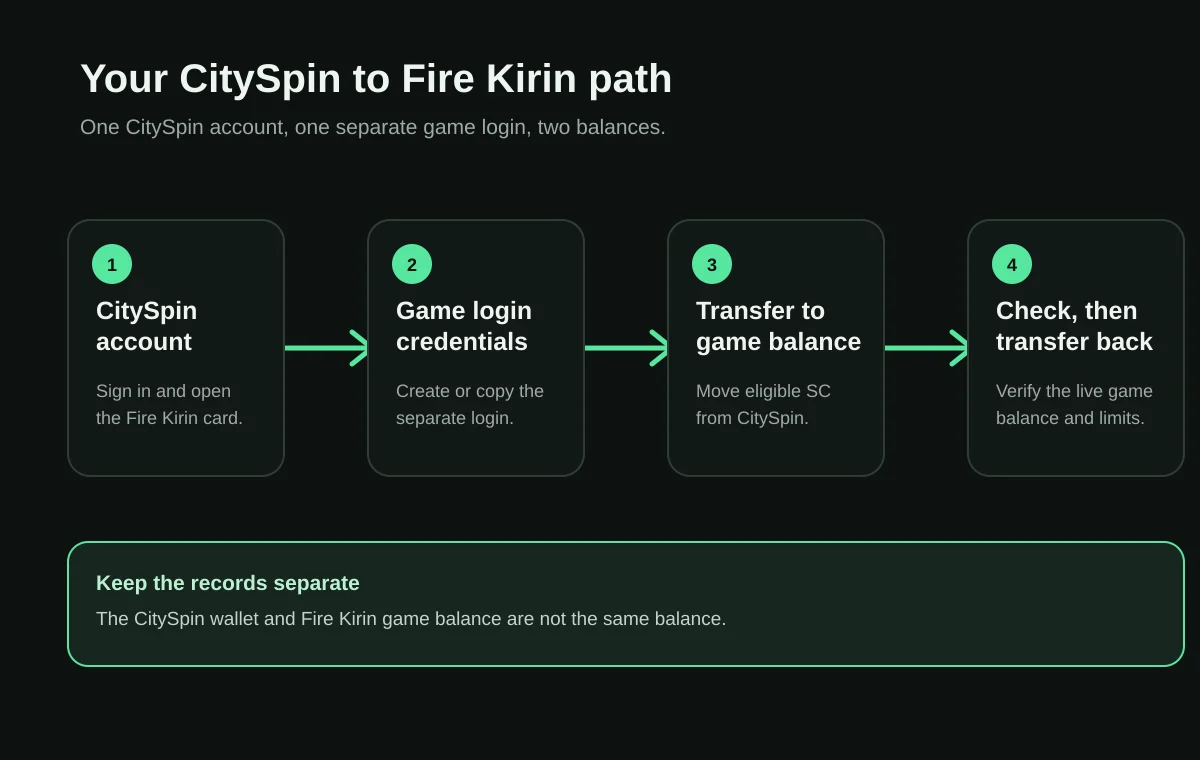
From CitySpin account to Fire Kirin
The exact controls and eligibility shown in your account remain the source of truth.
- 1Join CitySpin
Create or sign in to your CitySpin account.
- 2Choose a package
Choose a package only if it fits your plan.
- 3Transfer to game
Move eligible SC using the controls in your game panel.
- 4Play
Open the assigned game link and use the separate game credentials.
- 5Transfer back
Transfer an eligible balance back before a separate redemption request.
What kinds of games can appear in FireKirin?
FireKirin is most often recognized for colorful fish-table games, but public FireKirin-branded pages and account lobbies also describe slot-style, arcade-style, table-inspired, and other casino-style titles. The catalog is not necessarily identical for every account. A provider route may expose a different selection, and individual titles may be added, removed, renamed, or temporarily unavailable. The lobby visible after a successful sign-in is therefore more useful than a third-party list copied from another site.
| Category | Typical interface | Check before using credits |
|---|---|---|
| Fish-table | Moving targets, shot value, cannon or weapon controls, special targets | How shots consume balance and where the title explains target values |
| Slot-style | Reels, lines or ways, stake control, feature symbols | Stake per spin, paytable, feature rules, and auto-play status |
| Arcade-style | Rounds, targets, meters, levels, or timed actions | Round cost, scoring rules, and whether progress resets |
| Table-inspired | Card, wheel, dice, or dealer-like layout | The exact rule set and action value for that version |
| Promotional or event game | Limited-time banner, bonus meter, or special lobby entry | Eligibility, expiry, balance type, and written event terms |
How does a FireKirin fish-table interface generally work?
A fish-table screen commonly shows animated targets moving across a shared field. The player selects a target manually or uses an available lock-on control, then fires with a cannon, weapon, or shot whose value is tied to the account balance. Targets can have different displayed values, movement patterns, effects, or roles. Some games include bosses, bonus creatures, multipliers, power-ups, or group events. Those visual similarities do not prove that every title uses the same outcome rules.
The most important control is usually the shot value. If one tap uses more credits than expected, the balance can change quickly, especially when rapid-fire or auto-fire is active. A new player should locate the increase and decrease controls, current value, fire control, lock-on state, help menu, and exit button before beginning. If any label is unclear, pause rather than experimenting with a larger value.

How should a beginner start a FireKirin game?
- Use the correct account route
Sign in with the username and route supplied by the account provider. A similar-looking lobby may connect to a different service.
- Verify the starting balance
Record the displayed username and balance before opening a game. Resolve an unexpected balance before continuing.
- Open the help or paytable
Find the information, rules, question-mark, menu, or paytable control and read the title-specific instructions.
- Identify every value control
Locate the per-shot or per-action value, increase and decrease controls, rapid-fire state, auto-play state, and exit control.
- Begin at a low visible value
Use the smallest value that lets you understand how one action changes the balance. Do not increase it to recover prior losses.
- Check the balance during play
Pause regularly and compare the current balance with the starting record and the actions taken.
- Stop at the preset limit
End the session at the time or spending limit chosen before play, regardless of recent results.
- Exit and verify the final state
Return to the lobby, record the final balance, and use the provider's documented transfer process only when needed.
Which controls and values deserve the most attention?
| Control or display | Why it matters | Safer check |
|---|---|---|
| Account balance | Shows the current platform record | Compare it before, during, and after the session |
| Shot or stake value | Determines how quickly actions use credits | Confirm it after opening a title or changing rooms |
| Rapid-fire or auto-play | Can repeat actions without separate taps | Keep it off until its behavior and stop control are clear |
| Target lock | May direct repeated shots toward one target | Know how to unlock and stop firing |
| Paytable or help | Defines symbols, targets, features, and values | Use the current in-game version rather than a third-party image |
| History or ledger | May show session or balance activity | Save relevant records before requesting support |
| Exit or lobby | Ends or leaves the current view | Confirm the final balance after returning to the lobby |
Common FireKirin gameplay mistakes
FireKirin game troubleshooting
| Problem | Check first | Next step |
|---|---|---|
| Game does not open | Connection, session, final route, browser or app version | Refresh once, sign in again if appropriate, then preserve the error |
| Black or frozen screen | Device memory, browser storage, orientation, update status | Close other apps and retry without disabling security controls |
| Controls do not respond | Overlay, loading state, orientation, touch zoom, title help | Stop repeated tapping and reopen the title once |
| Balance looks wrong | Starting balance, shot value, auto controls, session history | Exit the game and contact the record-owning provider with evidence |
| Title disappeared | Catalog update, maintenance, route, account permissions | Ask the provider whether the title is currently available |
| Transfer is pending | Whether play ended and which transaction stage is shown | Do not duplicate the transfer; use the transfer or cash-out guide |
- Save the username, but never the password.
- Record the game title and exact time with time zone.
- Capture the starting and ending balances.
- Record the route, device, browser or app version, and exact error.
- Describe the last successful action and the first failed action.
- Send one complete report to the account provider instead of repeating the action.
Safer and more responsible FireKirin play
A game guide should explain controls, not promise profit. Decide the time and entertainment budget before opening a title, use reminders or device timers, avoid playing while distressed or impaired, and do not borrow money or use essential funds. Stop when the preset limit is reached. A recent loss, win, bonus, or near-miss is not a reason to extend the session.
If play is becoming difficult to control, pause access and use responsible-play tools or professional support. In the United States, the National Problem Gambling Helpline connects callers and texters with local resources. Availability and service details can change, so use the current information published by the National Council on Problem Gambling.
CitySpin video guide

Read transcript
0:00: The guide opens with the CitySpin welcome screen and introduces the official onboarding walkthrough. 0:20: The login panel shows Google and email login, the terms and privacy acknowledgement, password visibility, password recovery, and account creation options. 0:40: The CitySpin lobby demonstrates the balance display, search, game filters, game cards, favorites, and the Store, Redeem, Home, Rewards, and Support navigation. 1:00: The Knowledge Center appears with article categories, platform guidance, game-provider education, tutorials, customer support, responsible gaming, and industry news. 1:20: A CitySpin brand transition closes the guided product tour. 1:40: The final screen displays the CitySpin logo and cityspin.io as the official destination for the next step.
Fire Kirin on CitySpin
A third-party game platform available through supported CitySpin account workflows.
- Category
- Third-party game platform
- Supported on CitySpin
- Supported
- Availability
- Available to eligible CitySpin accounts where permitted.
- Requirements
- A CitySpin account, eligibility for the available workflow, and the separate game credentials shown in your account panel.
- Supported platforms
- Mobile and desktop access can vary by account, device, browser, and the current game link.
- Compatibility
- Use the current access method shown in your CitySpin game panel; availability can vary by device and account.
Frequently asked questions
What games are on FireKirin?
FireKirin is commonly associated with fish-table, slot-style, arcade-style, and other casino-inspired games. The exact catalog can vary by provider route, account, region, and software version, so use the lobby shown for your own account as the current source.
What is a FireKirin fish game?
A fish game is usually a shared or animated target-shooting game in which shots use a selected credit value and different targets display or imply different values and effects. Rules and outcomes vary by title, and the visible help screen or paytable should be read before play.
How do I start playing a FireKirin game?
Sign in through the route issued for your account, verify the displayed username and balance, open a game, find its help or paytable, identify the shot or stake value, and begin only after you understand how credits are used and how to exit.
Do fish-game strategies guarantee a win?
No. Target selection, shot timing, cannon settings, or published strategies do not guarantee a result. Treat every credit used as entertainment spending and stop at the limit set before the session.
What does the cannon or shot value mean?
It commonly represents the number or value of credits used for each shot. Increasing it can make the balance change faster. Confirm the specific title's displayed rules because labels and mechanics can differ.
Why did my FireKirin balance decrease quickly?
A high per-shot value, rapid-fire control, auto-fire setting, repeated taps, or a higher game stake can use credits quickly. Stop the game, record the balance, inspect the selected value and controls, and contact the account provider if the ledger appears inconsistent.
Can I practice FireKirin games for free?
Availability of demonstrations or promotional credits is provider- and title-specific. Do not assume a balance labeled free, bonus, or promotional is redeemable; read the issuer's current terms and the balance label first.
Why will a FireKirin game not open?
Possible causes include a stale route, expired session, unsupported browser, blocked storage, weak connection, app-version mismatch, maintenance, or an account restriction. Save the exact error and troubleshoot one variable at a time.
Are FireKirin fish games based on skill or chance?
The interface may allow target and shot choices, but those choices do not establish how every title determines outcomes. Unless current rules and independent evidence explain the mechanics, do not assume skill overrides chance or software-controlled results.
Where can I see a game's rules?
Look for an information, help, rules, paytable, question-mark, or menu control inside the specific title. If rules are missing or unclear, do not increase the shot or stake value; ask the account provider for the current instructions.
Can I play FireKirin games on a phone and computer?
Some providers offer Android, iPhone browser, H5, or desktop-browser access. Compatibility depends on the account route and version. Use the access option supplied for the username rather than an unrelated search result.
Who should I contact about a missing game balance?
Contact the service that created the account and can inspect its game ledger. Provide the username, game title, before-and-after balance, time, route, and screenshots, but never send the password or a one-time code.
Sources & References
Version 1.0
- FireKirin.com public platform pageFireKirin.com
Reviewed as a public FireKirin-branded description of game categories; not treated as proof that the site controls every account, route, or provider.
Accessed - How to recognize and avoid phishing scamsFederal Trade Commission
Primary US consumer guidance for checking unexpected links and protecting credentials.
Accessed - National Problem Gambling HelplineNational Council on Problem Gambling
Current US help-resource information for people affected by gambling-related harm.
Accessed - CitySpin Editorial PolicyCitySpin
Research, sourcing, corrections, and review standards applied to this guide.
Accessed
Summary
FireKirin game catalogs vary, but common categories include fish-table, slot-style, arcade-style, and other casino-inspired games. Beginners should verify the account and balance, read the exact title's rules, understand per-action values and automatic controls, set limits before play, and preserve evidence when a game or balance behaves unexpectedly.
Continue Your Journey
Choose the next step that matches what you need. Nothing here interrupts or changes the guide you just read.